Thursday, April 26, 2007

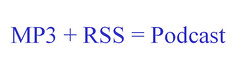
One Slide Podcasting Presentation

Idea by Aaron Schmidt at CIL 2007 speaker's reception. I'm actually using it. But not alone.

See also...Robert Rodriguez's 10 Minute Film School.

Uploaded by dwfree1967

Labels: , ,

Wednesday, April 25, 2007

Podzinger

During our Podcasting and Videocasting Post Conference session at CIL, I had a couple of questions I wasn't really able to completely answer at the time about Podzinger. So I did a little research and hopefully this will cover it.

Podzinger is a audio/ video search and discovery tool that uses speech to text recognition to search the actual contents of online audio and video, not just metadata attached by creators. Each search result has a cool little player that takes you directly to instances of your search term(s) in podcast/ videocast episodes. Excellent tool for research and getting around the real time aspect of listening to podcasts.

The first question was how does Podzinger work/ store content? I couldn't find a direct answer to this question, as they probably don't want me to make my own Podzinger competitor. But in order to be included in Podzinger searches, podcasters have to register with the service. So I'm guessing they don't actually download and store audio and video, but use an algorythm to scan and index content housed elsewhere. Then pull and package the data just for you when you do a search. They do claim to get new content Zinged and available in around 8 hours, so pretty speedy.

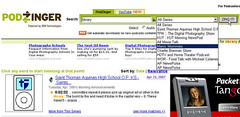
The second question was can you search one specific podcast series? No and yes. There's not a function that I could find that allows you to directly search one particular podcast. But once you do a search, a drop down menu appears that allows you to find all the instances of your term(s) in each series displayed on a page of results. The content in the drop down changes as you navigate through results screens that have results from different podcast series.
Podzinger

(Sorry for the small screen shot! Medium messed up my pretty, pretty sidebar! Click it to see bigger version.)

Podcasters who register can also download a widget to place on their website or blog to allow listeners to Zing just their content. This could be quite handy for library podcasts, epecially those with instructional content.

Another cool feature I just noticed is RSS search alerts. Each search you perform generates an RSS feed and instructions for adding it to iTunes, Yahoo! Music Engine and standard RSS readers like Bloglines or Google Reader. So if I search for the term "library", I get a feed to have future content containing "library" automatically delivered. Again, great for research or current awareness on topics that are heavily featured in podcasts.

I hope this helps and let me know if there are other questions about Podzinger, podcasting, Belgian beer, or life in general.

Labels: ,

The Utopian Library

One of the best things about library conferences is meeting new people to add to your circle of friends to discuss and debate and commisserate and generally have fun. Among the great new folks I met at CIL this year were Ruth and Jenn from the Skokie (IL) Public Library. They're both very enthusiastic about implementing new programs and 2.0 tools at their library and generally making it better place for the community. Ruth is also a very good sport when it comes to actually doing silly stuff on camera in a workshop.

And now they have a blog inspired by their experiences at CIL. It's called The Utopian Library. I restarted this blog after CIL last year, so I think it is super cool to find another one born out of the same experience.

My friend, co-presenter and PC to my Mac, David Lee King, wrote the other day about how to change the unchangeable, how to take what you learn at conferences or online or wherever and actually make it work at your library, often in the face of chage averse co-workers or administration. (There's a great discussion in the comments too.) I know this isn't a solution in all cases, but really just do it! Here's a great example: Ruth and/ or Jenn went to a session by Hal Kirkwood and got a good tip on a free tool to make customized tool bars. And they went home and made a customized tool bar for their library. How cool is that?

So congrats Ruth and Jenn on your blog. I'll look forward to reading about what you guys are up to. You both rock!

Labels: ,

Monday, April 23, 2007

CIL2007: Podcasting and Videocasting Post Conference Redux

Both the podcast and awesome straw whistling videocast created by the audience at the CIL post conference are linked from my wiki page for the session. As is David Lee King's videocasting presentation.

We had a request to list the equipment and settings used for podcasting at the session. So here we go:

1. I record using a Blue Snowball USB microphone and Audacity. Output is saved as 96 kbps MP3 files. Make sure to download the Audacity LAME encoder when you download Audacity so you can save your content as MP3! I showed the libsyn file size chart in the session if you are interested in comparing file sizes for different compression rates.
2. I host the files for both of my work podcasts on liberated syndication, which is a sliding scale pay hosting service. This was the best solution for me when I started doing podcasting. As I said in the session, I highly recommend hosting your files on a local server if at all humanly possible. Or a free media hosting site like blip.tv or OurMedia. I host personal and presentation podcasts and video on blip.tv.
3. The RSS feed for work podcasts is created automatically by lib syn and then Feedburned.
4. I post work podcasts on our news blog and a page on our website.
5. Our podcasts are included in iTunes, Yahoo Podcasts and a variety of other podcast search and discovery tools.

Hopefully that helps.

There was also a request for a screencast of exporting in Audacity. I promise I will get to this as soon as I can with a busy week at work. In the meantime, Audacity has a page of tutorials that will go over exporting and other Audacity features.

Labels: ,

Friday, April 20, 2007

CIL 2007: Podcasting and Videocasting Postconference


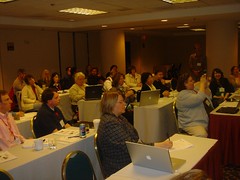
DSC02674.JPG
Originally uploaded by dwfree1967.

Thanks to everyone who came to the Podcasting and Videocasting Postconference at CIL this week. I had a great time talking about podcasting with you. The conversation kept going over lunch, in the shuttle and at the airport too!

My presentation is vailable on SlideShare(the embedded player was acting weird,so I'm just linking to them). Additional information on podcasting tools and resources and links to the podcasts we talked about are available on the session wiki page. And there are pics on Flikr.

We made a great podcast and a great videocast during the session too! The audio is available on Blip.tv or in a previous post here. I'll post a link to the video when David King gets it up and running.

I thought the session went really well. Everyone seemed to be having a good time and learning at the same time. I'll post responses to a few of the questions over the weekend or early next week.

Thanks again for coming. I had a blast. Let me know if you have further questions as well!

Labels: ,

CIL2007: Podcasting and Videocasting Postconference Podcast

Created for the Podcast class at Computers in Libraries 2007. Featuring Louise Alcorn and David Free.

Labels: ,

Wednesday, April 18, 2007

CIL2007: Landscape of the Future Library

Darien Library folks

Library should be place in town that everyone wants to go

Goal 1: Build fantastic new library
Goal 2: Use tech to be more responsive to patron demands

Tolerate uncertainty

Eternal values/ new technology

{Showing plans for new library, looks cool. Hopefully slides will be online}

Collaborative work space

Technology change drives changes in space and services {or something like that}

Trying to do something different, not just put new tech on top of old style library

Library for patrons

"We need library failures wiki." - learn from mistakes as well as successes

Get it right, finally, and then keep changing to stay ahead

what is voice of library? not editorial omniscience (we know better than patrons), bardic voice that tells story.

tech layers: admin/ staff/ patron indirect/ patron direct/ p2p

RFID materials handling system - designed building around materials handling system (3m/ FKI)

Skip RFP process

No tech services or Circ back office/ no catalogers/ ts=workflow managers and not clerks - want to be indifferent to how materials get back to lib

Active items back on shelf in 20 mins, want to double circ and half cost per item

Supply chain - fast second order/ direct ship/ same day delivery { Griffey says wal-mart supply chain model, most definitely}

Everyone out in front of desk, circ staff readers advisory, info staff at remote ref points, virtual library, tech staff work with patrons - learning commons style environment in PL setting

Concierge desk style ref desk - not a bunker! {awesome photo of ref desk bunker}

no security/ gaming/ no data ports {how is that responsive to needs? everybody w/ laptop has wireless?}

Plugs under all chairs in conference room!! {yes!}

{This talk was really interesting! Debate about what they're doing in room and on Twitter!}

All private money for building.

{Audience concern w/ quality control with all the outsourcing of TS etc}

Labels:

CIL 2007: Podcasting Cyber Tour


DSC02602.JPG
Originally uploaded by dwfree1967.
This was the greatest session in the history of...

Oops, what I mean is thanks to everyone who came to my cyber tour yesterday. It was a way bigger crowd than I expected for the middle of lunchtime! I hope you all learned at least a little bit about podcasting. Make sure to take a look at the wiki page for the presentation for lots of hopefully helpful links and such. I'll have the presentation slides up as soon as I can too.

I thought the session went pretty well. I did manage to do it in around 20ish minutes and had time for a couple of questions before Janie Hermann was up. Mission accomplished.

4/20 Update:
The presentation is available online on the wiki and SlideShare. Just joined SlideShare today and it rocks! Will post post-conference slides here this afternoon when I get my pics up on Flickr.

Labels: ,

Take Me Down To The Crystal City...

...where the buildings are gray and the streets are windy.

In case you haven't figured out by the live session blogging, I'm in beautiful Crystal City, VA for Computers In Libraries. The conference has been going pretty well so far. All of the sessions I've been to have be very good. I especially enjoyed Helene Blowers' talk on Learning 2.0 yesterday. I'd never seen her speak before and she was great. She walked all over the room w/ her wireless presenter and was very interactive. I couldn't get online for some reason during her session but will post notes to that and the podcasting for library instruction session sometime today.

The space is a little (OK a lot) more crowded than it was at the old hotel, but that's about my only gripe. There have been overflow rooms for some sessions and a room with a pole in the middle too. I had to sit in the floor in the back in a couple so no notes from those.

As always, the best part of the conference is hanging out w/ old friends and making new ones. Talking libraries and Internets or just non-work fun stuff is the highlight for me for sure. And I actually managed to escape to DC for a bit last night for a couple beers at the Brickskeller. And the Twittering. Always the twittering.

One more day and post-conference to go!

Labels: ,

Monday, April 16, 2007

CIL 2007: Gadgets x3

Barbara Fullerton, Sabrina Pacifici, Aaron Schmidt

1. treos! lots of new models.
2. shredding scissors. {cool}
3. TI projector phone
4. iPod 5th generation
5. iCharge for iPod - small ipod charger w/ 9v battery
6. nano battery - flexible, see through battery (not available yet)
7. iPhone - pricey but cool!
8. cube world digital stick people
9. cord indentifying stickers
10. jawbone bluetooth headset
11. collapsible chopsticks
12. jott.com - voice to text tool, phone to email or sms {cool!}
13. virtual keyboard
14. waterproof flexible keyboard ($27) - virtually indestructible
15. rear view computer mirror ($13)
16. dvd walkman - 5.5 hour battery life
17. palm sized microcopter
18. no more crt tvs
19. wireless convertible headset
20. targus wireless media presenter
21. ibm opitcal transceiver
22. usb missile launcher
23. usb vision and posture reminder
24.
25. google's dodgeball - find people in same area to meet-up {dont really see the point}
26. next gen robotic vacuum (vaporware)
27. cordinator - manage cords from 10 devices ($60) {word!}
28. trillian
29. world's smallest mp3 player
30. meebo {woohoo}
31. LED flashlight (june 2007)
32. usb toaster {awww yeah, but not real}
33. international ac travel adaptor
34. fireplace idock - where aaron draws the line ($3,650)
35. clocky the alarm clock
36. retro phone handset
37. picnic photo editor - free online photo editor {very nice}
38. chocolate gadgets!

gadgetarian.info (blog/ website)

Labels:

CIL 2007: Millennials and the Library

Marshall Breeding, Vanderbilt University

frenetic multitasking/ highly interactive style of working

forrester - "the millennials are coming" {usual demographic generalizations about millennial characteristics}

"things we're trying to do to satisfy millennials are things we should be doing anyway" {right on} - also hard to bridge gap between millennial and older gen styles in some regards

build collections that include media other than text: ejournals + ebooks {but everyone hates ebooks in reality!}/ lecture podcasts/ stock footage video libraries/ news archives/ data sets (census etc)- tool for mash-up and remix type projects

provide library search and discovery tools on level of commercial web

library websites don't match mil gen user expectations - mostly status quo, not intuitive, have to go to too many places to find different types of info

finding time magazine video from penn state {awesome}

metasearch "fundamentally bankrupt?" - very shallow results

redefinition of library catalog - have to redesign to capture attention

need to work on more comprehensive search, more like open archives initiative but better! problems with cooperation from commercial db providers - deep search capabilities

web 2.0 tools just a start in solving problem

xml api/ajax/microformats/ open search are support tools that can make lib stuff more like wider online world

replacement opacs: endeca/ aquabrowser - alternate search engine and interface on top of catalog data

extensible catalog - thinking about what library catalog should/ could be in future

interface expectations: more intuitive, get good stuff first, faceted browsing, rich visual info, navigational breadcrumbs

don't count on user starting at library site - know who they really search and guide them to resources/ collections, expose content through non-library interfaces (courseware etc)

global discovery vs local resources: discovery global, delivery local {good ideas, but how to do it well?}

Labels:

CIL2007: Student's World - Photo Diary Study

Nicole Hennig, MIT Libraries

Presentation available online


Usability testing only tells you how well stuff works

contextural research - figure out what people want and how they work

cultural probe: can't follow all day - students user cameras to record what they're doing

students kept diary of info seeking behavior over a week, follow-up interviews

photos jog memory of what they did

wikipedia used often as basic starting point for research

in general both grad (86%) and undergrad (93%) thought they were successful, librarians thought grads successful 77% of time and undergrads 85% {interesting that this is higher for undergrads}, less effective in searching for info on specific topic

rely on sources recommended from trusted network (librarians not included in this)

librarians don't always think of all the tools that people use outside lib sources: use topical discovery in non-lib tools (amazon to find books, then search opac to see if in lib)

students had trouble knowing where to look and using lib sources effectively

users want search simplified, too many starting points {huge issue in general! how to consolidate search in way that works}

worldcat local project - upcoming, has faceted browsing features

bookmarking/ tagging: students want to know what others are using, don't necessarily have to know who reviewers are specifically, just general info about them is OK

LibX firefox extension: puts catalog links in things like amazon, makes isbn etc live links to catalog from websites, highlight text on website to search google scholar or library catalog

mit libraries beta - place to experiment with technology like google labs

"successful systems extend the users' work practice" - ? {missed name}

"design works best when it models user behavior" - joshua porter

Q: did you compensate?
A: yes, $50 amazon gift card

Q: have to get permission to do?
A: yes, had to have training on doing human studies. had to get permission to use photos outside study

Labels:

CIL 2007: Web 2.0 And What It Means to Libraries

Lee Rainie - Pew Internet and American Life Project

{Very crowded}

"I adore librarians"

Showing Ask a Ninja video "about" podcasting {doh, can't use that one now!}

Web platform for computing

6 hallmarks of web 2.0 world:
1. Internet has become computer (broadband, wireless growing, people online a lot, 62% under 30 watch youtube vids)
2. Lots of people, especially young, creating and sharing content online (most blogging personal info for small audience)
3. More people are accessing content created by others {got Dooce confused w/Queen of Sky, but got point across}
4. Many sharing what they know and feel online
5. Contributing knowledge through sharing (peer to peer stuff - grid computing)
6. Customizing content (myyahoo etc)

5 Challenges for librarians
1. navigation
2. context
3. focus (best thinking, ideas in relaxation mode)
4. skepticism (learn to evaluate info)
5. ethical behavior (understand rules of cyberspace, privacy, when to disconnect)

Showing machine is us/ing us. {i love that video!}

Labels: